
clipboard.js 与 Vue
相关参考资料:
Clipboard.js
一个专职于“复制文本”操作的 js 库,以其短小精悍、简单实用的功能而被广泛应用
写这边文章的目的是为了说明:Clipboard.js的事件绑定存在直接绑定和事件委托两种方式
其实官网有说明使用方法和注意事项,不过鉴于以前没用过这个库,我并没有第一时间去看文档,反而是看过源码之后才发现文档里面居然已经写明了:
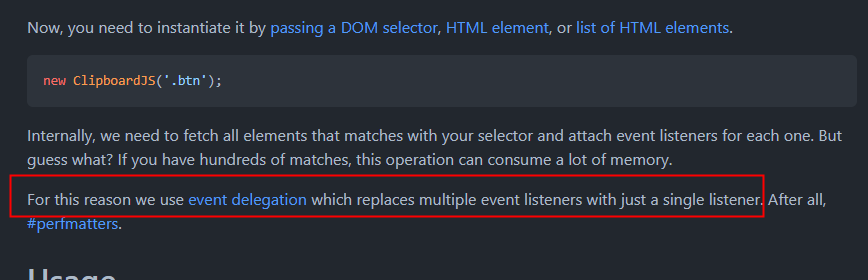
所以,看文档的好习惯,还是不能丢了···,那下面纯粹记录一下bug解决过程
一:Bug 描述
维护一个Vue2+Element的项目,调用Clipboard.js初始化的复制按钮;页面第一次进入后点击正常,后续退出、再进入,每次点击会累计多触发一次
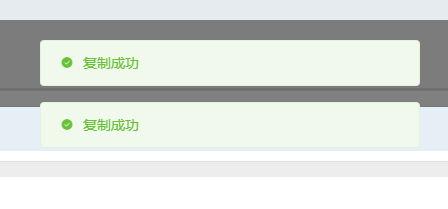
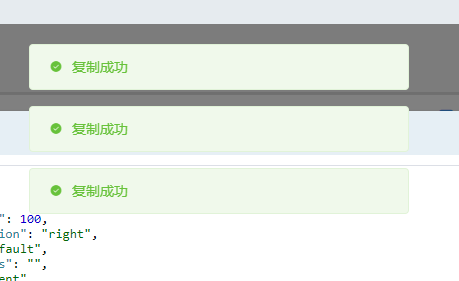
看看初始化是怎么写的:
if (!this.jsonClipboard) {
    this.jsonClipboard = new Clipboard('.json-btn');
    this.jsonClipboard.on('success', (e) => {
        this.$message.success('复制成功');
    })
}
这么写好像没问题;保证每次进入页面只初始化一次
而且每次页面进入,dom都是重新生成,不存在重复绑定同一个dom的情况
难道,他绑定的事件不是绑定在按钮dom?
二:源码查阅
GitHub:zenorocha/clipboard.js: Modern copy to clipboard. No Flash. Just 3kb gzipped (github.com)
文件:/src/clipboard.js
// https://github.com/zenorocha/clipboard.js/blob/master/src/clipboard.js#L22
/**
 * Base class which takes one or more elements, adds event listeners to them,
 * and instantiates a new `ClipboardAction` on each click.
 */
class Clipboard extends Emitter {
    /**
     * @param {String|HTMLElement|HTMLCollection|NodeList} trigger
     * @param {Object} options
     */
    constructor(trigger, options) {
        super();

        this.resolveOptions(options);
        this.listenClick(trigger); // 事件监听
    }

    // ...
    // 此处省略 1w 字
    // ...

    // https://github.com/zenorocha/clipboard.js/blob/master/src/clipboard.js#L58
    /**
     * Adds a click event listener to the passed trigger.
     * @param {String|HTMLElement|HTMLCollection|NodeList} trigger
     */
    listenClick(trigger) {
        this.listener = listen(trigger, 'click', (e) => this.onClick(e));
    }

    // ...
    // 此处省略 1w 字
    // ...
}
listen方法来自于组件good-listener,出自他自己之手
GitHub:zenorocha/good-listener: A more versatile way of adding & removing event listeners (github.com)
文件:/src/listen.js
// https://github.com/zenorocha/good-listener/blob/master/src/listen.js#L4
/**
 * Validates all params and calls the right
 * listener function based on its target type.
 *
 * @param {String|HTMLElement|HTMLCollection|NodeList} target
 * @param {String} type
 * @param {Function} callback
 * @return {Object}
 */
function listen(target, type, callback) {
    if (!target && !type && !callback) {
        throw new Error("Missing required arguments");
    }

    if (!is.string(type)) {
        throw new TypeError("Second argument must be a String");
    }

    if (!is.fn(callback)) {
        throw new TypeError("Third argument must be a Function");
    }

    if (is.node(target)) {
        return listenNode(target, type, callback);
    } else if (is.nodeList(target)) {
        return listenNodeList(target, type, callback);
    } else if (is.string(target)) {
        return listenSelector(target, type, callback);
    } else {
        throw new TypeError(
            "First argument must be a String, HTMLElement, HTMLCollection, or NodeList"
        );
    }
}

/**
 * Adds an event listener to a HTML element
 * and returns a remove listener function.
 *
 * @param {HTMLElement} node
 * @param {String} type
 * @param {Function} callback
 * @return {Object}
 */
function listenNode(node, type, callback) {
    node.addEventListener(type, callback);

    return {
        destroy: function() {
            node.removeEventListener(type, callback);
        }
    }
}

/**
 * Add an event listener to a list of HTML elements
 * and returns a remove listener function.
 *
 * @param {NodeList|HTMLCollection} nodeList
 * @param {String} type
 * @param {Function} callback
 * @return {Object}
 */
function listenNodeList(nodeList, type, callback) {
    Array.prototype.forEach.call(nodeList, function(node) {
        node.addEventListener(type, callback);
    });

    return {
        destroy: function() {
            Array.prototype.forEach.call(nodeList, function(node) {
                node.removeEventListener(type, callback);
            });
        }
    }
}

/**
 * Add an event listener to a selector
 * and returns a remove listener function.
 *
 * @param {String} selector
 * @param {String} type
 * @param {Function} callback
 * @return {Object}
 */
function listenSelector(selector, type, callback) {
    return delegate(document.body, selector, type, callback);
}
这里这哥们又调用了一个自己的库:delegate
Github:zenorocha/delegate: Lightweight event delegation (github.com)
三:解决方案
从上面的源码已经很清楚:
参数为node、nodeList时,直接使用addEventListener进行事件绑定;
参数为字符串时,会用事件委托实现选择器可能的所有dom的操作事件
而出现bug的原因自然是:
// 此处使用类选择器 .json-btn
this.jsonClipboard = new Clipboard('.json-btn');
所以在使用字符串/选择器做参数时,一定要在页面销毁/退出时,主动销毁绑定的委托事件:
beforeDestroy() {
    if (this.jsonClipboard) this.jsonClipboard.destroy();
},
四:总结
总的来说,依托外部组件进行的事件绑定,一定要清楚它是如何绑定、如何解绑
在Vue中使用Clipboard.js,不管用何种方式进行初始化,它绑定的事件会一直存在
所以任何时候都应在组件销毁(前)进行手动销毁,即使指定Dom的事件绑定不会出现类似bug,但绑定的事件会一直存在于内存中,对性能也是一种负担